> ## Documentation Index
> Fetch the complete documentation index at: https://api.docs.flare.io/llms.txt
> Use this file to discover all available pages before exploring further.
# Authentication
Flare's API is available at `https://api.flare.io`.
Requests are authenticated with **API tokens** which can be obtained using an **API key**.
## Authentication Objects and Purpose
Used to generate API tokens. Does not expire.
Used to access API endpoints. Expires after 1 hour.
## Authentication Steps
From the profile page.
Using the API key.
Using the API token.
### 1 - Obtaining an API key
Users can generate API keys by visiting the [Profile page](https://app.flare.io/#/profile) under the "API Keys" section.
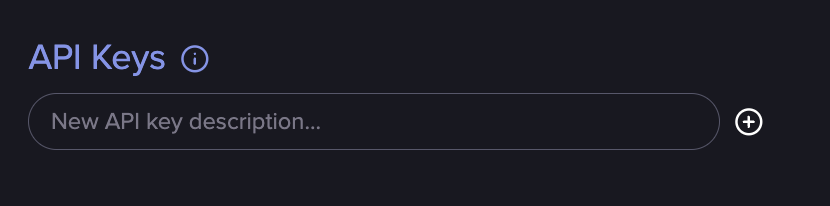 API keys are associated to a user and will have the same permissions as the user that generated them:
* If you can access a tenant, the API key will have access to that tenant.
* If you are an organization administrator, the API key will have organization administrator access.
### 2 - Obtaining an API Token
API tokens are obtained using Flare API keys. They can be generated using the
[tokens/generate ](/api-reference/tokens/endpoints/generate)
endpoint.
```bash cURL example theme={null}
curl --request POST \
--url https://api.flare.io/tokens/generate \
--header 'Authorization: '
```
### 3 - Access an API endpoint
API tokens may then be used by specifying the `Authorization: Bearer ` header.
API tokens can be tested using the
[tokens/test ](/api-reference/tokens/endpoints/test)
endpoint.
```bash cURL example theme={null}
curl --request GET \
--url https://api.flare.io/tokens/test \
--header 'Authorization: Bearer '
```
## Finding tenant IDs
Users can find the IDs of the tenants they have access to by visiting the
[Profile page](https://app.flare.io/#/profile) under the "Tenants" section.
API keys are associated to a user and will have the same permissions as the user that generated them:
* If you can access a tenant, the API key will have access to that tenant.
* If you are an organization administrator, the API key will have organization administrator access.
### 2 - Obtaining an API Token
API tokens are obtained using Flare API keys. They can be generated using the
[tokens/generate ](/api-reference/tokens/endpoints/generate)
endpoint.
```bash cURL example theme={null}
curl --request POST \
--url https://api.flare.io/tokens/generate \
--header 'Authorization: '
```
### 3 - Access an API endpoint
API tokens may then be used by specifying the `Authorization: Bearer ` header.
API tokens can be tested using the
[tokens/test ](/api-reference/tokens/endpoints/test)
endpoint.
```bash cURL example theme={null}
curl --request GET \
--url https://api.flare.io/tokens/test \
--header 'Authorization: Bearer '
```
## Finding tenant IDs
Users can find the IDs of the tenants they have access to by visiting the
[Profile page](https://app.flare.io/#/profile) under the "Tenants" section.
 ## End-to-End Examples
These are end-to-end examples in various programming languages.
```python theme={null}
import os
import requests
api_key = os.environ.get("FLARE_API_KEY")
if not api_key:
raise Exception("Please provide an API key")
# Generate the API token.
token: str = requests.post(
"https://api.flare.io/tokens/generate",
headers={
"Authorization": api_key,
},
).json()["token"]
# Now we can use our token to access the testing endpoint.
resp = requests.get(
"https://api.flare.io/tokens/test",
headers={
"Authorization": f"Bearer {token}",
},
)
print(resp.json())
```
```python Python SDK theme={null}
import os
from flareio import FlareApiClient
api_key = os.environ.get("FLARE_API_KEY")
if not api_key:
raise Exception("Please provide an API key")
client = FlareApiClient(api_key=api_key)
# Generate the API token.
token: str = client.generate_token()
# Now we can use our token to access the testing endpoint.
resp = client.get("/tokens/test")
print(resp.json())
```
## End-to-End Examples
These are end-to-end examples in various programming languages.
```python theme={null}
import os
import requests
api_key = os.environ.get("FLARE_API_KEY")
if not api_key:
raise Exception("Please provide an API key")
# Generate the API token.
token: str = requests.post(
"https://api.flare.io/tokens/generate",
headers={
"Authorization": api_key,
},
).json()["token"]
# Now we can use our token to access the testing endpoint.
resp = requests.get(
"https://api.flare.io/tokens/test",
headers={
"Authorization": f"Bearer {token}",
},
)
print(resp.json())
```
```python Python SDK theme={null}
import os
from flareio import FlareApiClient
api_key = os.environ.get("FLARE_API_KEY")
if not api_key:
raise Exception("Please provide an API key")
client = FlareApiClient(api_key=api_key)
# Generate the API token.
token: str = client.generate_token()
# Now we can use our token to access the testing endpoint.
resp = client.get("/tokens/test")
print(resp.json())
```